> ## Documentation Index
> Fetch the complete documentation index at: https://elastly.io/docs/llms.txt
> Use this file to discover all available pages before exploring further.
# Connecting Shopify
> Create an app for your store, install it, and paste its credentials into Elastly. It then syncs your catalog, variants, inventory, cost, customers, and realized orders.
Elastly reads your catalog, variants, inventory, per-item cost, customers, and realized orders from
Shopify over the Admin GraphQL API. Your catalog comes in at the variant level, which is the unit
Shopify actually prices.
You create the app yourself, in your own Shopify Dev Dashboard, and give Elastly its credentials. The
app belongs to you. Nobody else can install it, and you can uninstall it at any time. Because the
sync runs unattended on a schedule, Elastly uses Shopify's client credentials grant: there is no
browser redirect and no approval screen to click through.
Setup is done once by a store owner, or by staff with app permissions, and takes about five minutes.
## What you'll need
* **App development permissions** on your store. You reach the Dev Dashboard from your Shopify admin:
click your store name in the top right, then [**Dev Dashboard**](https://admin.shopify.com).
* Your **store domain**, the permanent `your-store.myshopify.com` address. It stays the same even if
your storefront runs on a custom domain, because Shopify's API always uses it. You'll find it under
**Settings → Domains**.
## Create the app
In the Dev Dashboard, open **Apps**, click **Create app**, choose **Start from Dev Dashboard**, name
it something your team will recognize such as "Elastly", and click **Create**.
**This is not an App Store listing.** You are not publishing anything. This app is private to your
store, it never appears in the Shopify App Store, and it needs no review. Leave the distribution
settings alone.
## Request the access it needs
Open the **Versions** tab, set your app URL to `https://app.elastly.io`, and set the scopes to
exactly these five. Nothing more, nothing less. Shopify restricts apps that ask for data they don't
use.
| Scope | Required | What it's for |
| ---------------- | -------- | ----------------------------------------------------------------------------- |
| `read_products` | Yes | Catalog, variants, price, and compare-at price. The catalog it prices. |
| `read_inventory` | Yes | Per-item cost (`InventoryItem.unitCost`) and on-hand quantity. |
| `read_customers` | Yes | Who is buying, and their tags. Tags are where per-segment pricing comes from. |
| `read_orders` | Yes | Realized sales. The outcome the learning loop trains on. |
| `write_products` | Yes | Publishes approved prices back to your variants. Off until you turn it on. |
If Shopify asks for a **redirect URL**, set it to `https://app.elastly.io`. This flow never redirects
your browser, so Elastly does not use that URL, but Shopify's app configuration expects a value.
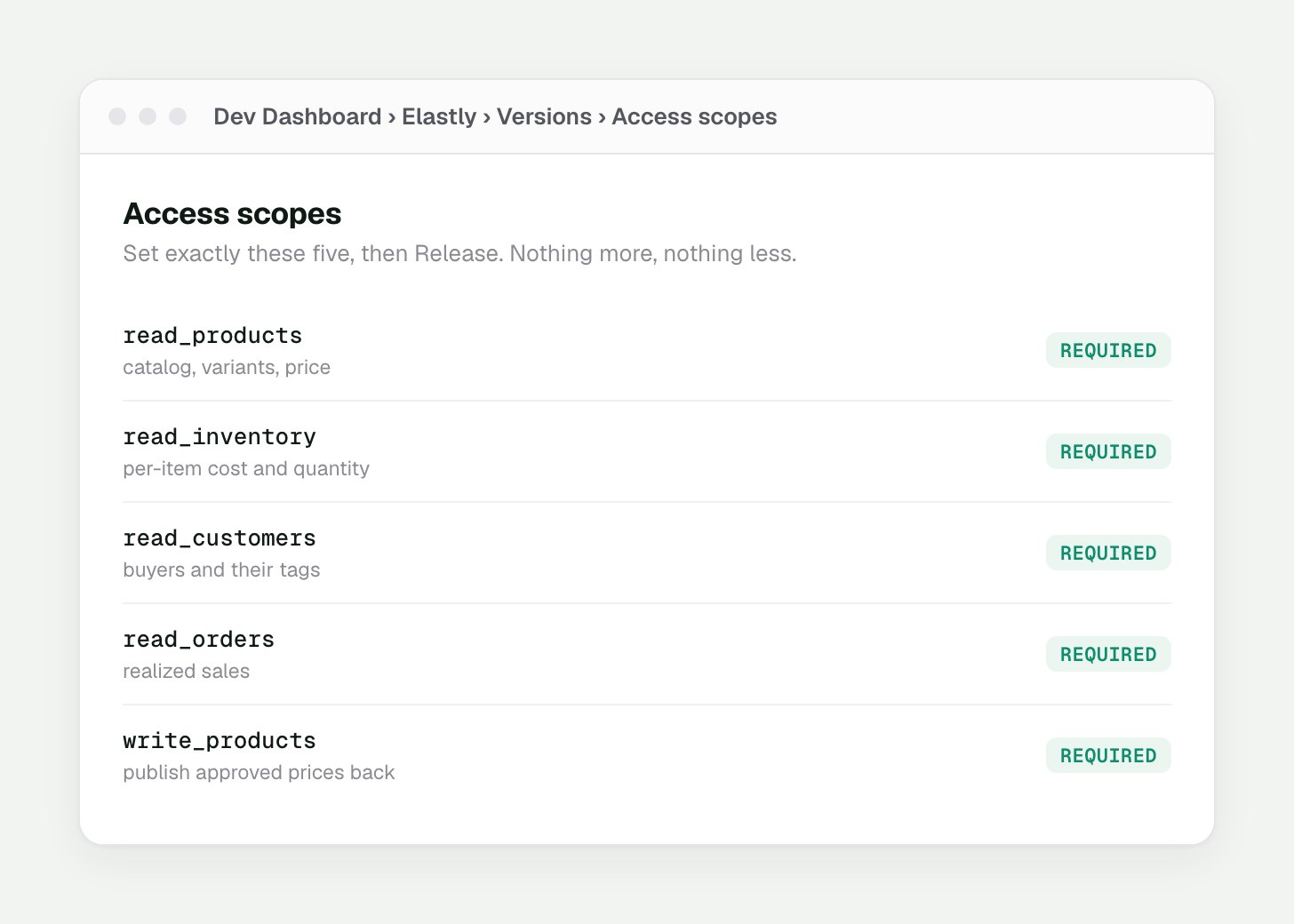 Click **Release** to save the version. Scopes only take effect once you release.
## Install it on your store
Go to the app's **Home** tab, scroll down, and click **Install app**. Pick your store, then click
**Install**.
## Copy the credentials
Open the app's **Settings** tab and copy its **Client ID** and **Client secret**. Elastly encrypts
both and uses them to request a fresh access token from Shopify whenever it syncs.
**Treat the secret like a password.** Anyone holding the client secret can request access to your
store's data. Paste it straight into Elastly. Don't email it, and don't paste it into a chat.
## Connect
In Elastly, open [Integrations](https://app.elastly.io/integrations) and press **Connect Shopify**.
Enter your store domain, client ID, and client secret. Elastly checks them against Shopify
straight away, so a typo fails here rather than silently later.
Elastly takes you to the **Field mapping** page, with sensible defaults already filled in from
your store. Review them, adjust anything that's wrong, and save. See
[Field mapping](/docs/field-mapping).
There is no approval screen and no redirect. You granted the access when you installed your own
app, so Elastly requests a token directly. Tokens last 24 hours and Elastly renews them for you.
## If you uninstall the app
Elastly subscribes to Shopify's **app/uninstalled** notification when you connect, so it knows the
moment you remove the app from your store. The connection is marked disconnected, and Elastly stops
trying to sync. Your synced data stays in Elastly until you reset the workspace, so reinstalling and
reconnecting picks up where you left off.
## What Elastly reads
Elastly maps Shopify's fields onto its canonical schema. The defaults below fit a standard store.
Anything custom you keep in metafields can be mapped too.
* **Products and variants.** Title, vendor (used as the brand), product type (used as the category),
and each variant's price and compare-at price. The variant is the priced unit.
* **Cost.** `InventoryItem.unitCost` per variant, which is your margin basis. If you keep cost in a
metafield instead, map it and Elastly reads it from there.
* **Inventory.** On-hand quantity per variant, used by stock-aware strategies.
* **Customers.** Display name and tags. Tags seed per-segment pricing, so tier-based rules work from
the first sync.
* **Orders.** Realized, line-level sales, dated by when the order was processed. That date is the
signal the learning loop uses to tune margins.
**Elastly keys on the variant id, not the SKU.** A Shopify SKU is free text and is often blank or
duplicated, so by default `sku` maps from `variant.id`. If you price on your own SKU, point the
mapping at it on the Field mapping page.
**Cost is the gate.** A variant with no cost has no margin basis, so Elastly leaves it unpriced
until a later sync brings a cost in. Set cost on your variants in Shopify, or map a cost metafield,
before you expect recommendations.
## How the sync runs
* **On a schedule, unattended.** Set the cadence and direction under the connector's Sync settings.
You can pause auto-sync whenever you want.
* **Incremental.** After the first full pull, each run only fetches records that changed since the
last watermark.
* **Environment-aware.** Development stores are detected and labelled Sandbox. Live stores show
Production.
## Verify permissions
If a scope is missing, Shopify quietly returns nothing for that record type, and the sync looks like
it simply found no customers or no orders. Open **Diagnostics** on the connector page and press
**Check permissions**. Elastly reads the granted scopes straight from Shopify and flags anything
missing. It runs the same check after every sync.
If a scope shows Missing, add it to your app's Versions tab in the Dev Dashboard, press **Release**,
then reconnect the store in Elastly.
## Price write-back
Write-back is off until you turn it on, so Elastly is read-only by default. When you enable it, an
approved price publishes straight to the variant in Shopify. Elastly sets the variant price and
touches nothing else in your store.
* Turn it on by setting the connector's direction to include **out** under Sync settings. It stays
paused until you do.
* It needs the **write\_products** access you granted when you created the app. If you left that scope
out, add it in the Dev Dashboard, release the version, and reconnect.
* Every price is yours to approve first. Elastly never publishes a price you haven't signed off on.
Click **Release** to save the version. Scopes only take effect once you release.
## Install it on your store
Go to the app's **Home** tab, scroll down, and click **Install app**. Pick your store, then click
**Install**.
## Copy the credentials
Open the app's **Settings** tab and copy its **Client ID** and **Client secret**. Elastly encrypts
both and uses them to request a fresh access token from Shopify whenever it syncs.
**Treat the secret like a password.** Anyone holding the client secret can request access to your
store's data. Paste it straight into Elastly. Don't email it, and don't paste it into a chat.
## Connect
In Elastly, open [Integrations](https://app.elastly.io/integrations) and press **Connect Shopify**.
Enter your store domain, client ID, and client secret. Elastly checks them against Shopify
straight away, so a typo fails here rather than silently later.
Elastly takes you to the **Field mapping** page, with sensible defaults already filled in from
your store. Review them, adjust anything that's wrong, and save. See
[Field mapping](/docs/field-mapping).
There is no approval screen and no redirect. You granted the access when you installed your own
app, so Elastly requests a token directly. Tokens last 24 hours and Elastly renews them for you.
## If you uninstall the app
Elastly subscribes to Shopify's **app/uninstalled** notification when you connect, so it knows the
moment you remove the app from your store. The connection is marked disconnected, and Elastly stops
trying to sync. Your synced data stays in Elastly until you reset the workspace, so reinstalling and
reconnecting picks up where you left off.
## What Elastly reads
Elastly maps Shopify's fields onto its canonical schema. The defaults below fit a standard store.
Anything custom you keep in metafields can be mapped too.
* **Products and variants.** Title, vendor (used as the brand), product type (used as the category),
and each variant's price and compare-at price. The variant is the priced unit.
* **Cost.** `InventoryItem.unitCost` per variant, which is your margin basis. If you keep cost in a
metafield instead, map it and Elastly reads it from there.
* **Inventory.** On-hand quantity per variant, used by stock-aware strategies.
* **Customers.** Display name and tags. Tags seed per-segment pricing, so tier-based rules work from
the first sync.
* **Orders.** Realized, line-level sales, dated by when the order was processed. That date is the
signal the learning loop uses to tune margins.
**Elastly keys on the variant id, not the SKU.** A Shopify SKU is free text and is often blank or
duplicated, so by default `sku` maps from `variant.id`. If you price on your own SKU, point the
mapping at it on the Field mapping page.
**Cost is the gate.** A variant with no cost has no margin basis, so Elastly leaves it unpriced
until a later sync brings a cost in. Set cost on your variants in Shopify, or map a cost metafield,
before you expect recommendations.
## How the sync runs
* **On a schedule, unattended.** Set the cadence and direction under the connector's Sync settings.
You can pause auto-sync whenever you want.
* **Incremental.** After the first full pull, each run only fetches records that changed since the
last watermark.
* **Environment-aware.** Development stores are detected and labelled Sandbox. Live stores show
Production.
## Verify permissions
If a scope is missing, Shopify quietly returns nothing for that record type, and the sync looks like
it simply found no customers or no orders. Open **Diagnostics** on the connector page and press
**Check permissions**. Elastly reads the granted scopes straight from Shopify and flags anything
missing. It runs the same check after every sync.
If a scope shows Missing, add it to your app's Versions tab in the Dev Dashboard, press **Release**,
then reconnect the store in Elastly.
## Price write-back
Write-back is off until you turn it on, so Elastly is read-only by default. When you enable it, an
approved price publishes straight to the variant in Shopify. Elastly sets the variant price and
touches nothing else in your store.
* Turn it on by setting the connector's direction to include **out** under Sync settings. It stays
paused until you do.
* It needs the **write\_products** access you granted when you created the app. If you left that scope
out, add it in the Dev Dashboard, release the version, and reconnect.
* Every price is yours to approve first. Elastly never publishes a price you haven't signed off on.