> ## Documentation Index
> Fetch the complete documentation index at: https://elastly.io/docs/llms.txt
> Use this file to discover all available pages before exploring further.
# Connecting WooCommerce
> Generate a REST API key in WooCommerce, then paste your store URL, consumer key, and consumer secret into Elastly. It syncs your catalog, variations, stock, customers, and realized orders.
Elastly reads your catalog, variations, stock, customers, and realized orders from WooCommerce over
the WooCommerce REST API. A simple product comes in as one SKU. A variable product comes in as one
SKU per variation, which is the unit WooCommerce actually prices.
There is no plugin to install for the connection itself, and nothing to submit for review. You
generate a REST API key in your own store and give Elastly three values.
Setup takes about five minutes. You need to be able to reach WooCommerce settings on the store.
## Before you start: WooCommerce has no cost field
**Read this first.** WooCommerce core does not store a cost of goods. Elastly prices from margin,
so **without a cost it cannot recommend a price for anything.** A store with no cost will connect,
sync, and report success, and still have nothing to price.
Elastly reads cost from a Cost of Goods plugin. It looks for these product meta keys, in this order,
and takes the first one it finds:
| Meta key | Checked | Written by |
| ------------------ | ------- | ------------------------------------------------------------------------------------------------------------------------------------- |
| `_wc_cog_cost` | First | [Cost of Goods for WooCommerce](https://woocommerce.com/products/cost-of-goods/), the widely used commercial plugin. |
| `_alg_wc_cog_cost` | Second | [Cost of Goods for WooCommerce by WPFactory](https://wordpress.org/plugins/cost-of-goods-for-woocommerce/), which has a free version. |
| `_cost_of_goods` | Third | A generic key used by some themes and custom setups. |
If you already keep cost somewhere else, such as a custom field, you don't need a plugin: map that
field to **Cost** on the connector's [Field mapping](/docs/field-mapping) page after you connect.
If a whole catalog syncs without a single cost, Elastly tells you so on the connector page rather than
leaving you to wonder why nothing is priced.
## Generate a REST API key
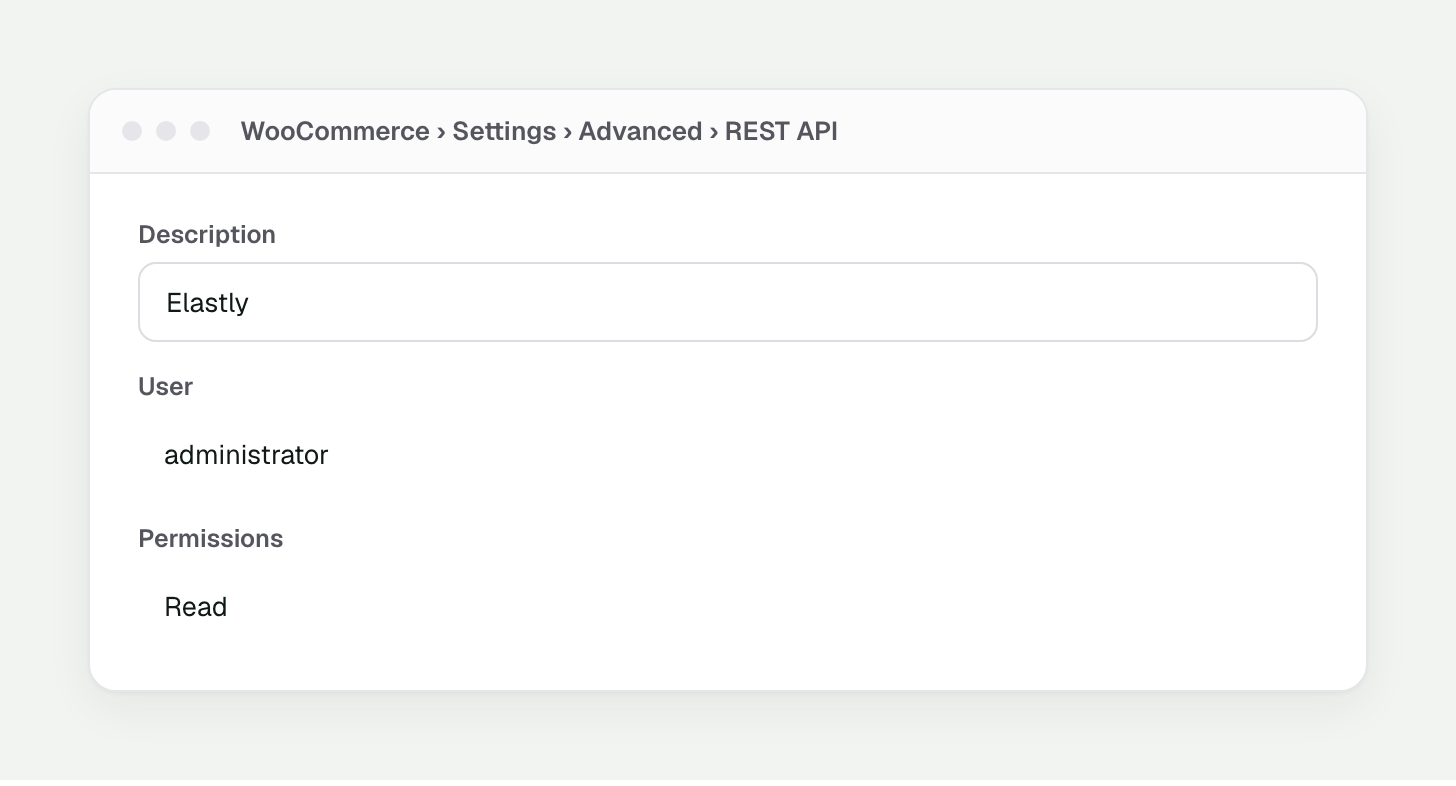
In your WordPress admin go to **WooCommerce → Settings → Advanced → REST API** and press **Add
key**. Describe it as `Elastly` and set the user to an administrator.
| Level | Required | What it covers |
| ---------- | -------- | ------------------------------------------------------------------------------------------------- |
| Read | Yes | Catalog, variations, stock, customers, and orders. Everything Elastly needs to price. |
| Read/Write | Optional | Only if you want approved prices to publish back. You can start with Read and swap the key later. |
 Press **Generate API key**. WooCommerce shows a **consumer key** (`ck_...`) and a **consumer
secret** (`cs_...`).
**The secret is shown once.** Leave the page and the consumer secret is gone for good. It is
stored hashed, so nobody can read it back out, not even from the database. If you lose it,
revoke the key and generate a new one.
## Connect
In Elastly, open [Integrations](https://app.elastly.io/integrations) and press **Connect WooCommerce**.
Enter your **store URL** (for example `https://mystore.com`), the **consumer key**, and the
**consumer secret**. Elastly checks them against your store immediately, so a typo fails here
rather than silently later.
Your store must be reachable over **HTTPS**. WooCommerce sends the key on every request, so
Elastly will not connect over plain HTTP.
Elastly takes you to the **Field mapping** page with sensible defaults already filled in from your
store. If your cost lives in a custom field, map it here. See [Field mapping](/docs/field-mapping).
## What Elastly reads
* **Products and variations.** A simple product is one SKU. A variable product becomes one SKU per
variation, each with its own price and stock. A variation with no price of its own inherits the
product's price.
* **Cost.** From a Cost of Goods meta key, or any field you map yourself. This is your margin basis.
* **Stock.** On-hand quantity per SKU, used by stock-aware strategies.
* **Customers.** Name, email, and role. These seed per-segment pricing.
* **Orders.** Realized, line-level sales. This is the outcome the learning loop trains on.
## Products with no SKU
WooCommerce doesn't force you to set a SKU. If a product or variation has none, Elastly keys it on its
WooCommerce product and variation IDs instead. It still syncs, and its sales still reach the learning
loop. You don't have to backfill SKUs to use Elastly.
## Which orders count as a sale
Elastly only learns from orders that actually completed, so by default that means orders in the
**Completed** status. Cancelled, refunded, failed, and pending orders are ignored, and a refund never
teaches the engine that a price won.
**If your orders never reach Completed.** Plenty of stores leave paid orders sitting in
**Processing** and never mark them Completed. If that's you, Elastly would see no sales at all. Add
`processing` to the statuses under the connector's **Sync settings** and your sales will start
feeding price learning.
## How the sync runs
* **On a schedule, unattended.** Set the cadence and direction under the connector's Sync settings.
You can pause auto-sync whenever you want.
* **Incremental for products and orders.** After the first full pull, each run only fetches records
that changed since the last watermark.
* **Customers are always a full pull.** The WooCommerce REST API offers no date filter on customers,
so Elastly re-reads the customer list each time rather than pretending it can do less.
* **Times are read in GMT.** WooCommerce reports order dates in both your store's local timezone and
GMT. Elastly always reads the GMT value, so a sale is stamped at the moment it actually happened no
matter where your store is set.
## Verify permissions
If the key is under-scoped, WooCommerce quietly returns nothing for that record type, and the sync
looks like it simply found no customers or no orders. Open **Diagnostics** on the connector page and
press **Check permissions**. Elastly checks the key against your store and flags anything missing. It
runs the same check after every sync.
## Price write-back
Write-back is off until you turn it on, so Elastly is read-only by default. When you enable it, an
approved price publishes straight to the SKU in WooCommerce: the variation price for a variable
product, or the product price for a simple one. Elastly sets the price and changes nothing else on the
product.
* Turn it on by setting the connector's direction to include **out** under Sync settings.
* It needs a **Read/Write** key. If you generated a Read key, create a new one and reconnect.
* Every price is yours to approve first. Elastly never publishes a price you haven't signed off on.
Press **Generate API key**. WooCommerce shows a **consumer key** (`ck_...`) and a **consumer
secret** (`cs_...`).
**The secret is shown once.** Leave the page and the consumer secret is gone for good. It is
stored hashed, so nobody can read it back out, not even from the database. If you lose it,
revoke the key and generate a new one.
## Connect
In Elastly, open [Integrations](https://app.elastly.io/integrations) and press **Connect WooCommerce**.
Enter your **store URL** (for example `https://mystore.com`), the **consumer key**, and the
**consumer secret**. Elastly checks them against your store immediately, so a typo fails here
rather than silently later.
Your store must be reachable over **HTTPS**. WooCommerce sends the key on every request, so
Elastly will not connect over plain HTTP.
Elastly takes you to the **Field mapping** page with sensible defaults already filled in from your
store. If your cost lives in a custom field, map it here. See [Field mapping](/docs/field-mapping).
## What Elastly reads
* **Products and variations.** A simple product is one SKU. A variable product becomes one SKU per
variation, each with its own price and stock. A variation with no price of its own inherits the
product's price.
* **Cost.** From a Cost of Goods meta key, or any field you map yourself. This is your margin basis.
* **Stock.** On-hand quantity per SKU, used by stock-aware strategies.
* **Customers.** Name, email, and role. These seed per-segment pricing.
* **Orders.** Realized, line-level sales. This is the outcome the learning loop trains on.
## Products with no SKU
WooCommerce doesn't force you to set a SKU. If a product or variation has none, Elastly keys it on its
WooCommerce product and variation IDs instead. It still syncs, and its sales still reach the learning
loop. You don't have to backfill SKUs to use Elastly.
## Which orders count as a sale
Elastly only learns from orders that actually completed, so by default that means orders in the
**Completed** status. Cancelled, refunded, failed, and pending orders are ignored, and a refund never
teaches the engine that a price won.
**If your orders never reach Completed.** Plenty of stores leave paid orders sitting in
**Processing** and never mark them Completed. If that's you, Elastly would see no sales at all. Add
`processing` to the statuses under the connector's **Sync settings** and your sales will start
feeding price learning.
## How the sync runs
* **On a schedule, unattended.** Set the cadence and direction under the connector's Sync settings.
You can pause auto-sync whenever you want.
* **Incremental for products and orders.** After the first full pull, each run only fetches records
that changed since the last watermark.
* **Customers are always a full pull.** The WooCommerce REST API offers no date filter on customers,
so Elastly re-reads the customer list each time rather than pretending it can do less.
* **Times are read in GMT.** WooCommerce reports order dates in both your store's local timezone and
GMT. Elastly always reads the GMT value, so a sale is stamped at the moment it actually happened no
matter where your store is set.
## Verify permissions
If the key is under-scoped, WooCommerce quietly returns nothing for that record type, and the sync
looks like it simply found no customers or no orders. Open **Diagnostics** on the connector page and
press **Check permissions**. Elastly checks the key against your store and flags anything missing. It
runs the same check after every sync.
## Price write-back
Write-back is off until you turn it on, so Elastly is read-only by default. When you enable it, an
approved price publishes straight to the SKU in WooCommerce: the variation price for a variable
product, or the product price for a simple one. Elastly sets the price and changes nothing else on the
product.
* Turn it on by setting the connector's direction to include **out** under Sync settings.
* It needs a **Read/Write** key. If you generated a Read key, create a new one and reconnect.
* Every price is yours to approve first. Elastly never publishes a price you haven't signed off on.